
Architecture Overview
The Hikma Health platform consists of three core components that work together to provide a complete health data management system:
- Hikma Health Server — A full-stack TypeScript application built with TanStack Start that combines the API backend and admin web interface into a single deployable unit.
- Hikma Health Mobile Application — A React Native app for Android and iOS that enables healthcare workers to collect patient data in the field.
- PostgreSQL Database — A relational database that stores all patient records, form definitions, and system configuration.
An optional fourth component, the Local Sync Hub, can be added for clinics with little or no internet. It is a desktop app that runs on a clinic machine and acts as a LAN-local sync server: mobile devices sync to it over the local network, and it relays buffered changes to the cloud server when a connection is available.
How the components connect
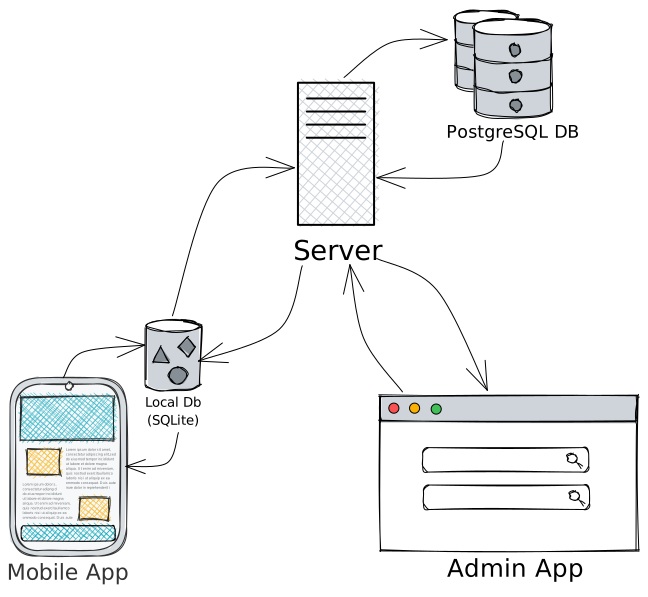
Hikma Health Server
The server is the central piece of the platform. It is a single full-stack application that provides:
- REST API — Endpoints consumed by the mobile application for syncing patient data, forms, and other records.
- Admin Web Interface — A browser-based dashboard for administrators to manage users, view data, configure forms, and export reports.
- Database Migrations — Automatic schema migrations that run on startup to keep the database up to date.
The server is built with TypeScript and TanStack Start, making it straightforward to deploy as a single process.
Mobile Application
The mobile application is the primary data entry point for healthcare workers. Key architectural decisions include:
- Offline-first design — All data is stored locally on the device and synced when connectivity is available.
- Dynamic forms — Form definitions are fetched from the server and rendered dynamically, allowing administrators to change data collection without app updates.
- Background sync — Data synchronization happens automatically in the background when a network connection is detected.
Database
The platform uses PostgreSQL as its sole data store. The schema includes tables for:
- Patients and patient records
- Events and event forms
- Users and authentication
- Sync metadata for conflict resolution
Data flow
- Data collection — Healthcare workers use the mobile app to register patients and record clinical events using dynamic forms.
- Local storage — All data is persisted locally on the device first, ensuring no data loss in low-connectivity environments.
- Synchronization — When connectivity is available, the mobile app syncs data to the server via the REST API. Where a Local Sync Hub is deployed, devices instead sync to the hub over the local network (using an encrypted RPC transport), and the hub relays to the server when it gets online.
- Administration — Administrators access the web interface to review data, manage users, configure forms, and generate reports.